THE PET PHOTO CHECKLIST
How to Photograph Your Pet for an AI Portrait
By Black Mango Studio · · 5 minute read
For an AI pet portrait, start with a sharp photo taken near your pet’s eye level, in soft daylight, with the eyes, ears and muzzle clearly visible. Use an original, unfiltered file. Add a body reference when coat markings or size matter, and keep each animal’s photos on its own participant card.
Which photo should I choose?
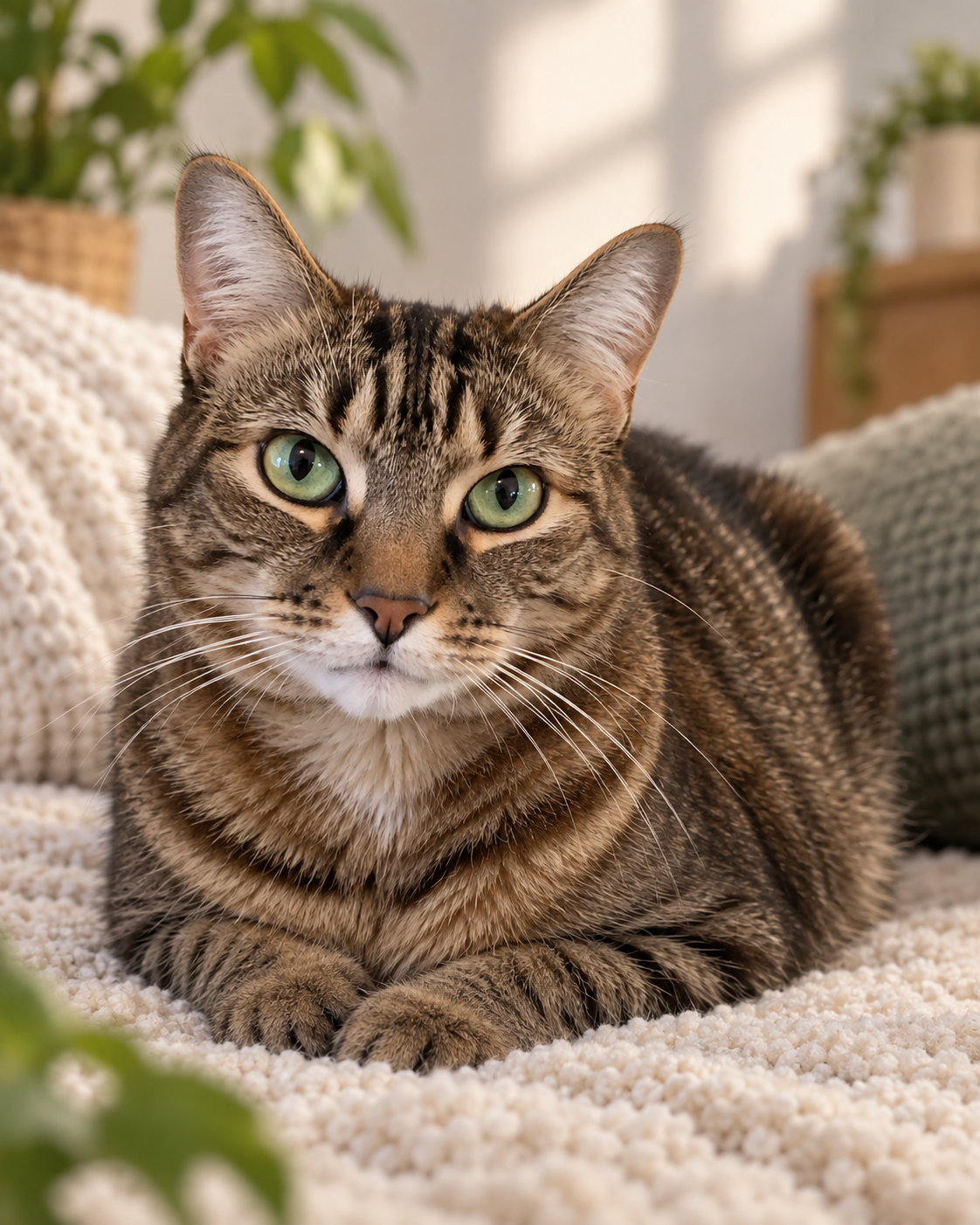
Choose the photo that shows your companion clearly, even if the room behind them is ordinary. A sharp picture on the kitchen floor is a more useful reference than a beautiful sunset silhouette with an unreadable face.
- The visible eye is sharp when you enlarge the original.
- Ears and muzzle are unobstructed, with a little room around the head.
- You can distinguish dark fur from shadow and pale fur from glare.
- The image shows one animal clearly, rather than several overlapping pets.
- Coat colour and markings look familiar, without a strong colour filter.
You do not need a special camera or a perfectly obedient model. Start with a quiet moment your pet already enjoys: a favourite rug, a window seat or a pause after a walk.
How do I take a useful pet photo with my phone?
Lower the phone toward your pet’s eye level, leave some distance from their nose, and take a few frames while they are comfortable. The aim is clear reference information, not a complicated photoshoot.
- Find gentle light. Try a bright room near a window or a shaded outdoor spot. Turn yourself rather than making your pet hold an awkward pose. Check that the face has visible detail.
- Choose a straightforward view. A front or slight three-quarter view is a practical starting point. Avoid making a very close, wide-angle nose photo your only reference.
- Check focus. If your phone supports tap-to-focus, tap near the visible eye. Take several photographs, then compare the eyes at full size rather than judging only the small gallery thumbnail.
- Keep the original. Use the original photo instead of a screenshot or a heavily edited social-media copy. Skip smoothing and dramatic colour filters when preparing references.
- Keep it comfortable. Take a break when your pet loses interest. A relaxed photograph tomorrow is worth more than forcing a pose today.
Photographer Nigel Danson’s advice in Nikon’s pet-photography guide includes Shoot at eye level
and using shade for soft reflected light. Those are useful starting points for a phone reference too. Read Danson’s pet-photography guide.
Nikon’s guide to animal-detection autofocus also emphasises sharp eyes. You do not need that camera feature to use this checklist; the practical check is whether the eye is actually sharp in your saved photograph. Read Nikon’s focus guidance.
What if my pet has black, white or patterned fur?
Look for visible texture and readable markings before you look for a dramatic background. For a dark coat, choose a frame where the eyes and muzzle do not disappear into shadow. For a pale coat, check that bright areas still show fur detail.
For patterned coats, compare the two sides of the face. A white eyebrow, uneven nose stripe, ginger patch or single white paw may be the detail that makes the portrait feel like your pet. Keep an extra angle if your main image does not show that feature.
An optional note can describe an observable detail: “White patch above the left eye, as shown in the reference.” A description helps communicate what matters, but it cannot guarantee an exact match or replace a clear image.
Do I need a face photo, a body photo or both?
Start with a clear face reference. Add a body view when you want the finished portrait to show the animal’s build, coat pattern, paws or tail. Keep additional views attached to the same pet rather than adding them as another participant.
| Portrait | Useful reference detail |
|---|---|
| Face or chest-up | Eyes, ear shape, muzzle and facial markings. |
| Full body | The face plus a clear view of body outline, paws, tail and coat pattern. |
| Two pets | Separate references for each animal and a template that supports two pets. |
| You and your pet | Your own portrait reference and a separate pet reference; a body view can help communicate relative size. |
For a shared keepsake, see our pet-and-owner portrait guide. You do not need to have taken your best pictures together.
How do I use these photos in Black Mango Studio?
Choose a look with the right participants, add each animal’s reference to its own card, and review the result beside your original. The pet portrait guide explains the available directions.
- For one companion, explore A Little Personality. For a pair, open Two Little Personalities and check its requirements.
- Upload the reference for each pet. Add another angle or a body view only when it provides useful detail.
- Review the chosen look and any optional details, then follow the creation flow.
- Compare the finished portrait with your original before saving it or ordering a print.
The checklist helps you prepare clearer references; it is not a tested guarantee of likeness. AI can still change markings, anatomy or expression. Our template illustrations show a style direction, not a promise that every upload produces the same result.
What should I check in the finished AI pet portrait?
Check familiar details first: eye colour, ear shape, muzzle length, coat pattern and the relationship between head and body. Then inspect paws, tail and any contact with a person’s hands.
- Are markings on the correct side, without unexplained duplicates?
- Does the pet’s build and relative size feel plausible?
- Are visible paws and limbs coherent rather than fused or repeated?
- Does fur meet the background naturally, especially around ears and whiskers?
- Is there enough space around the ears and tail for your intended crop?
If a correction is needed, describe the specific mismatch rather than asking only for “more realistic.” Keep your original photo too. The everyday moment and a new, AI-created keepsake can each have a place in the album.
A few practical questions
Can I use an old photo of a pet?
Yes, you can try an existing photograph if the relevant details are visible and you have permission to use it. A blurred or very small original limits the information available. An AI portrait is an imagined keepsake, not a reconstruction you can verify as a real event.
Can I upload one photograph containing two pets?
For Black Mango Studio’s separate-reference workflow, prepare an individual image for each animal and choose a template with enough pet capacity. Each participant should be clear in their own reference.
Will the AI preserve every marking?
No exact match is guaranteed. Clear references and specific notes communicate distinctive features, but you should still inspect the finished image.
Should I remove the background first?
You do not need to cut your pet out of the photo. Prefer an intact original with visible fur edges; a rough cutout can remove useful whisker and ear detail.
Written and published by Black Mango Studio. Published September 22, 2026. Photography sources linked above; preparation and product guidance are our editorial recommendations.
Explore pet looks →